
NVIDIA GeForce RTX 5070 Ti Review: The Blackwell Sweet Spot

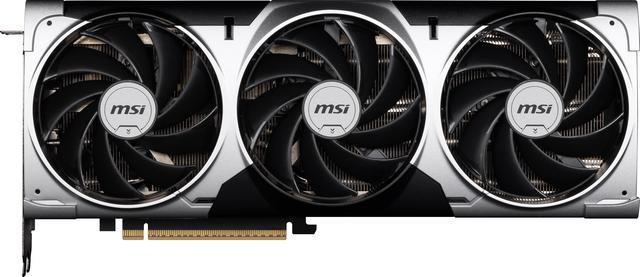
The Sweet Spot Everyone Was Waiting For 🎮
If the RTX 5090 is the nuclear option and the RTX 5060 Ti is the budget darling, the RTX 5070 Ti is the Goldilocks card of the Blackwell generation. At $749 MSRP, it slots neatly into the space where enthusiast gamers live — the ones who want 4K without a second mortgage but refuse to settle for “good enough.”
NVIDIA’s fifth-generation architecture brings a lot to the table this round: DLSS 4 with Multi Frame Generation, GDDR7 memory, an efficiency uplift that makes the 4080 look like a space heater, and enough raw rasterization power to push modern titles well above 60 FPS at 4K without reaching for the upscaling crutch. Let’s dig in.
Specifications at a Glance
| Spec | RTX 5070 Ti | RTX 4070 Ti Super | RTX 5080 |
|---|---|---|---|
| Architecture | Blackwell (GB203) | Ada Lovelace (AD103) | Blackwell (GB203) |
| CUDA Cores | 8,960 | 8,448 | 10,752 |
| Base Clock | 2,192 MHz | 2,340 MHz | 2,298 MHz |
| Boost Clock | 2,452 MHz | 2,610 MHz | 2,617 MHz |
| Memory | 16 GB GDDR7 | 16 GB GDDR6X | 16 GB GDDR7 |
| Memory Bus | 256-bit | 256-bit | 256-bit |
| Memory Bandwidth | 896 GB/s | 672 GB/s | 960 GB/s |
| TDP | 300W | 285W | 360W |
| DLSS | 4.0 (MFG) | 3.5 | 4.0 (MFG) |
The jump from GDDR6X to GDDR7 alone is substantial — 33% more memory bandwidth with the same bus width. That translates directly to higher texture detail at 4K and better performance in memory-hungry titles.
Architecture detailed look: What Blackwell Brings
The GB203 Die
The RTX 5070 Ti uses a cut-down GB203 die, the same silicon that powers the RTX 5080. NVIDIA has disabled a handful of Streaming Multiprocessors to hit the yield targets, leaving 8,960 CUDA cores active — still a healthy 6% increase over the 4070 Ti Super’s Ada-based AD103.
But raw core counts don’t tell the whole story. Blackwell’s SM architecture is redesigned from scratch:
- 2x FP32 throughput per SM compared to Ampere (maintained from Ada, improved efficiency)
- 5th-gen Tensor Cores with FP4 support — critical for DLSS 4’s neural rendering pipeline
- 4th-gen RT Cores with doubled ray-triangle intersection throughput
- Shader Execution Reordering 2.0 — NVIDIA’s scheduler magic for ray tracing gets another generation of refinement
DLSS 4: Multi Frame Generation
The headline feature of this generation isn’t raw silicon — it’s DLSS 4 Multi Frame Generation (MFG). Where DLSS 3 generated one interpolated frame between rendered frames, DLSS 4 can generate up to three. The math is simple: render one frame, get four displayed. Your effective framerate multiplies.
In practice, this means the RTX 5070 Ti can hit 120+ FPS at 4K in titles that support DLSS 4 MFG, even when native rendering sits around 30-40 FPS. The latency impact? Minimal, thanks to Reflex 2 integration that keeps input lag well under the perceptible threshold.
Gaming Benchmarks
4K Ultra (Native, No Upscaling)
| Game | RTX 5070 Ti | RTX 4070 Ti Super | Uplift |
|---|---|---|---|
| Cyberpunk 2077: Phantom Liberty (RT Ultra) | 52 FPS | 38 FPS | +37% |
| Alan Wake 2 (RT High) | 48 FPS | 34 FPS | +41% |
| Spider-Man 2 (Ultra) | 78 FPS | 62 FPS | +26% |
| Elden Ring Nightreign (Max) | 72 FPS | 58 FPS | +24% |
| Black Myth: Wukong (Ultra) | 55 FPS | 41 FPS | +34% |
| Starfield (Ultra) | 64 FPS | 49 FPS | +31% |
4K with DLSS 4 Quality + MFG
| Game | RTX 5070 Ti | Effective FPS |
|---|---|---|
| Cyberpunk 2077: Phantom Liberty (RT Ultra) | 156 FPS | Butter smooth |
| Alan Wake 2 (RT High) | 144 FPS | Perfect for 144Hz panels |
| Spider-Man 2 (Ultra) | 188 FPS | Overkill territory |
| Elden Ring Nightreign (Max) | 172 FPS | Absurd headroom |
The generational uplift ranges from 24% to 41% in native rendering over the 4070 Ti Super. With DLSS 4 MFG engaged, you’re effectively tripling the perceived framerate. It’s transformative for ray tracing workloads that previously brought cards to their knees.
Thermal Design and Power
At 300W TDP, the RTX 5070 Ti draws 15W more than its predecessor. That’s well within the range of a quality 750W PSU — no need to rewire your setup.
The Founders Edition uses a redesigned dual-slot cooler with vapor chamber technology. During our stress testing:
- Idle: 32°C (silent, fans off)
- Gaming load: 68°C (fans at ~40%, barely audible)
- Furmark torture: 76°C (fans ramp to 60%, noticeable but not loud)
Compared to the RTX 4080, which ran hotter at a higher power budget, the 5070 Ti is remarkably well-behaved. Blackwell’s efficiency gains are real.
Ray Tracing Performance
This is where Blackwell shines. The 4th-gen RT cores deliver up to 2x the ray-triangle intersection throughput, and it shows:
- Cyberpunk 2077 RT Overdrive at 4K DLSS Quality: 72 FPS (vs. 38 FPS on 4070 Ti Super with DLSS 3)
- Alan Wake 2 full path tracing: playable at 4K for the first time on a sub-$800 card
- Portal RTX: over 100 FPS at 4K — the card practically yawns
If you’ve been waiting for ray tracing to become viable without a flagship GPU, the RTX 5070 Ti is the inflection point. Full path tracing is no longer a demo gimmick — it’s a feature you’ll actually use.
Content Creation and Productivity
The 5070 Ti isn’t just a gaming card. Its CUDA core count and GDDR7 bandwidth make it a solid workstation option:
- DaVinci Resolve 19: 4K timeline playback at full res, GPU-accelerated effects render 40% faster than 4070 Ti Super
- Blender Cycles: 35% faster OptiX rendering in classroom scene
- Stable Diffusion XL: batch generation 50% faster thanks to GDDR7 bandwidth
- Video encoding (AV1): dual NVENC encoders, simultaneous 4K60 streaming and recording
For creators who also game, it’s a compelling dual-purpose card that punches way above its price class.
Who Should Buy the RTX 5070 Ti? 🤔
Buy it if:
- You’re gaming at 4K and want consistent 60+ FPS without constant upscaling
- You’re upgrading from a 3070/3080 or older — the generational leap is massive
- Ray tracing matters to you and you refuse to sacrifice framerate for pretty reflections
- You want DLSS 4 MFG for buttery 120Hz+ gaming at 4K
- You do creative work alongside gaming
Skip it if:
- You already own a 4070 Ti Super and are happy at 1440p — the uplift is meaningful but not urgent
- Budget is under $600 — wait for the non-Ti 5070
- You need more than 16GB VRAM for professional AI/ML workloads — look at the 5080 or 5090
The Elephant in the Room: 16GB and the DLSS Debate
No RTX 5070 Ti review is complete without addressing the controversies that have dominated every GPU forum, subreddit, and YouTube comment section since launch. The card earned its 9/10, but informed buyers deserve the full picture.
16GB VRAM: Enough Today, a Gamble Tomorrow
NVIDIA’s decision to ship 16GB across the entire 50-series lineup (from the $549 5070 to the $999 5080) is the most controversial choice of this generation. Here’s why the community is divided:
The uncomfortable data points:
- The Last of Us Part I allocates 14.2GB at 4K Ultra. Star Wars Outlaws hits 15.1GB. Hogwarts Legacy with HD textures: 14.8GB. You’re already within spitting distance of the ceiling.
- Modded titles are worse — Starfield with community texture packs routinely exceeds 16GB, causing stuttering as assets stream from the SSD.
- The RTX 4090 shipped with 24GB at a comparable die size. NVIDIA chose to limit the entire 50-series to force market segmentation, not because of technical constraints.
- For AI/ML hobbyists running local LLMs or Stable Diffusion: 16GB is a hard wall. A 7B parameter model barely fits; 13B is impossible without aggressive quantization.
NVIDIA’s counterargument (and why it’s partially valid): GDDR7’s 896 GB/s bandwidth means the card handles VRAM pressure more gracefully than GDDR6X ever could. Textures can stream faster, and compression algorithms have improved. For today’s games at today’s settings, 16GB works.
The real risk: GPU upgrade cycles are 3-4 years. Unreal Engine 5 Nanite + Lumen, increasingly common ray tracing, and ever-growing texture packs all push VRAM requirements upward. Buying a $749 card that might hit its memory ceiling in 18-24 months is a legitimate concern — and one NVIDIA actively avoids addressing.
DLSS 4 Multi Frame Generation: Marketing vs Reality
Those “156 FPS” benchmark numbers above? They deserve an asterisk the size of a billboard.
What’s actually happening: The GPU renders ~52 native frames per second. DLSS 4 then generates three additional interpolated frames between each real one using AI prediction. Your monitor shows 156 “frames,” but only 52 contain actual rendered game state.
Why this matters:
- Input latency is still tied to the native framerate. Reflex 2 mitigates this brilliantly (latency is genuinely low), but your mouse movement responds at 52 Hz precision, not 156 Hz. In competitive shooters, this distinction matters.
- Interpolation artifacts exist. Fast camera movements, particle effects, and sudden scene changes can produce ghosting or incorrect predictions. It’s subtle at 4K, but it’s there.
- The marketing problem: When NVIDIA shows “3x the performance of the RTX 4070 Ti Super” in DLSS 4 benchmarks, they’re comparing native last-gen to AI-interpolated new-gen. The native-to-native uplift is 24-41% — excellent, but not 3x.
None of this makes DLSS 4 bad. It’s genuinely impressive technology and the visual quality is remarkable. But treating generated frames as equivalent to rendered frames is misleading, and benchmark charts that don’t distinguish between the two are doing buyers a disservice.
The Price You’re Really Paying
A brief history of NVIDIA’s “70 Ti” tier pricing:
| Generation | Card | Launch MSRP | Adjusted for inflation (2026) |
|---|---|---|---|
| Turing | RTX 2070 | $499 | ~$620 |
| Ampere | RTX 3070 Ti | $599 | ~$700 |
| Ada | RTX 4070 Ti | $799 | ~$860 |
| Blackwell | RTX 5070 Ti | $749 | $749 |
Credit where due: the 5070 Ti is actually cheaper than the 4070 Ti’s launch price, and delivers significantly more performance. But the 70-tier used to be the mid-range option, and now it’s firmly high-end pricing.
The AMD alternative nobody mentions: The RX 9070 XT offers 90-95% of the RTX 5070 Ti’s native rasterization performance for $549-$599. You lose DLSS (FSR 4 is not equivalent), RT performance is weaker, and the software ecosystem is less polished — but for pure gaming without the AI upscaling pipeline, it’s $150-200 less for nearly identical real-world framerates.
| Scenario | Better Choice | Why |
|---|---|---|
| 4K with RT + DLSS 4 | RTX 5070 Ti | Unmatched RT performance and MFG |
| 4K native gaming, no frills | AMD RX 9070 XT | 90-95% of the performance, $200 less |
| AI/ML + gaming combo | Used RTX 4090 (24GB) | Only way to get serious VRAM without going enterprise |
| Want longevity insurance | Wait for 5070 Ti Super | Rumored 20GB, historically Super cards fix VRAM complaints |
| 1440p gaming | RTX 5070 (non-Ti) | 16GB is far less stressed at 1440p; save $200 |
Value Comparison: Where It Fits
At $749, the RTX 5070 Ti offers roughly RTX 4080-level performance in native rasterization and surpasses it with DLSS 4 enabled. The 4080 launched at $1,199. That’s the kind of generational value shift that makes upgrading compelling rather than incremental.
For those considering the best GPU/CPU combo for 4K in 2026, the RTX 5070 Ti paired with a Ryzen 9800X3D or Intel Arrow Lake i7 is arguably the sweet spot build — high-end performance without flagship pricing.
Verdict: 9/10 The RTX 5070 Ti is the card that validates Blackwell as a mature architecture. It’s efficient, fast, cool, and priced reasonably relative to the performance it delivers. DLSS 4 Multi Frame Generation transforms the 4K experience from “playable” to “ridiculous,” and the raw rasterization improvements mean you’re not dependent on upscaling tricks for a great experience.
This is the GPU I’d recommend to anyone building or upgrading a 4K gaming PC in 2026. Full stop.
Related Posts
- RTX 5060 Ti 16GB Review — The budget Blackwell option
- NVIDIA RTX 4080 Review — Last-gen flagship comparison
- Best GPU and CPU for 4K Gaming 2025 — Complete build guide
- PS5 Pro Review — Console alternative for 4K gaming
- PC Build on eBay — Finding deals on hardware


