
Don’t be lazy and use different passwords for your important accounts

Today I was reading the shocking news of a massive password leak from one of Yahoo’s services, specifically, around 450k email addresses and passwords where dumped from Yahoo Voices with a relatively simple hacking technique that almost anybody interested in computing could reproduce.
Seems like this is kind of leaks are getting “trendy”, it is unbelievable that really big companies like Yahoo or Sony (a few months ago could just store passwords in text plain in their databases) or create a webpage vulnerable to SQLInjection, when any decent web developer would not commit such errors, or at least it is what I think, well sometimes anyone can commit errors but minor in comparison.
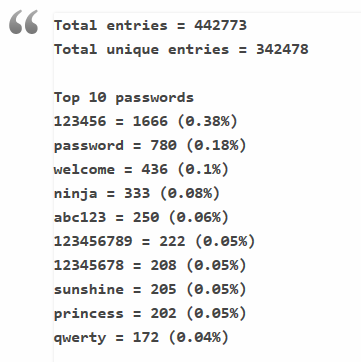
Please, use a real password
You should already heard it many times but when I see the statistics of the leaked passwords I can’t stop worrying about how people can be so negligent with their personal information.The top password keeps being “123456”, probably because, this service required 6 letters for the password :).
If you don’t know how a good password, and easy to remember, should be please read this already famous comic. It will be a good idea to change your passwords in important accounts like email, blogging or buying sites.
If you can’t keep up with many passwords, there are many free services where you can store passwords securely like lastPassor use a free program like KeePass. I am using KeePass synced with dropbox so I can use my passwords everywhere, it also gives you the option to create secure and random password for new accounts or auto-type your login info in your service. It’s a nice and free program!
What can I do if I have an account on Yahoo Voices
- First of all, change your password! To a strong one too!
- Second, change all the password to any account on any online service that shared the email registered on Yahoo Voices
- And finally try to stay away from bad or insecure services, try to use a password manager with a good password too
- And the most important be cautious of everything and everyone.
What Makes a Strong Password in Practice
A strong password has three characteristics: length, unpredictability, and uniqueness. The minimum recommended length is 12 characters, though 16 or more is preferable. Combining unrelated words (the “correct horse battery staple” method from the xkcd comic referenced above) creates passwords that are both memorable and resistant to brute-force attacks. A four-word passphrase contains more entropy than a typical 8-character password with mixed symbols.
The critical rule is uniqueness: every account must have its own password. When Yahoo Voices leaked 450,000 plain-text passwords, the immediate danger was not just those Yahoo accounts — it was every other service where users had reused the same password. Attackers routinely take leaked credentials and try them on banking sites, email providers, and social media platforms. This technique, called credential stuffing, succeeds because the average person reuses passwords across 5-7 different services.
Password Manager Workflow
Using a password manager like KeePass or LastPass effectively involves:
- Generate a unique random password for each service (20+ characters, all character types).
- Store the password in the encrypted vault — no need to remember it.
- Protect the vault with one strong master passphrase that you do memorize.
- Sync the vault across devices (KeePass via Dropbox, LastPass via their cloud).
- Enable two-factor authentication on both the password manager and critical accounts.
The only password you actually need to remember is the master password. Everything else is generated, stored, and auto-filled by the manager. This approach eliminates the temptation to reuse passwords because creating a new unique one requires zero mental effort.
Two-Factor Authentication
Beyond strong passwords, enabling two-factor authentication (2FA) on important accounts provides a second layer of protection. Even if a password is leaked, the attacker cannot access the account without the second factor — typically a time-based code from an authenticator app or a hardware security key. In 2012 this was a niche feature; today, most major services support it and it should be enabled on every account that offers it.
Google Authenticator and Authy are the most common options for generating time-based one-time passwords (TOTP codes). Hardware keys like YubiKey provide the strongest protection against phishing because they verify the domain you’re authenticating against, making man-in-the-middle attacks essentially impossible. When setting up 2FA, always save the backup recovery codes in your password manager — losing access to your authenticator device without recovery codes can permanently lock you out of accounts. For email accounts specifically, 2FA is non-negotiable — a compromised email address gives attackers password reset access to every other service linked to that address, making it the single most valuable target in any credential breach like the Yahoo incident discussed above.
[
Hacking: The Art of Exploitation, 2nd Edition](https://www.amazon.com/dp/1593271441?tag=vp04a-20&linkCode=ogi&th=1&psc=1)


